
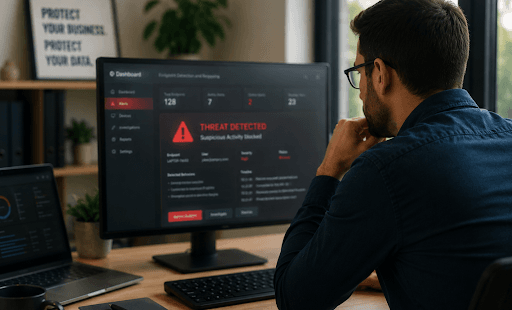
Endpoint detection and response for small business is a cybersecurity approach that monitors laptops, desktops, servers, and remote workstations for suspicious behavior. When something unusual happens, EDR helps detect the threat, investigate what caused it, contain the affected device, and support recovery before the issue spreads across the network.
Here is a simple example. An employee opens what looks like a normal vendor invoice. Nothing obvious happens at first, and traditional antivirus may not flag the file right away. A few minutes later, the laptop begins running unusual commands, contacting an unknown server, and trying to change files in shared folders. EDR can recognize that behavior as suspicious, alert the right team, and help isolate the device before one infected laptop becomes a company-wide ransomware event.
For small businesses, that speed can make the difference between a contained incident and days of downtime.
Why Is Antivirus Alone No Longer Enough for Small Business Devices?
Antivirus still has a place, but it is not built to catch every modern attack. Many threats today do not arrive as obvious virus files. They may begin with stolen passwords, phishing links, malicious scripts, fake browser prompts, fileless malware, or remote access tools that look legitimate at first glance.
That creates a problem for small businesses. A single employee laptop may have access to email, cloud storage, accounting software, customer records, and shared files. If that device is compromised, the attacker may use it as a doorway into the rest of the business.
This is where EDR adds value. Instead of only asking, “Is this file known to be bad?” EDR also asks, “Is this device behaving in a way that suggests an attack?” For example, a laptop opening a spreadsheet is normal. A laptop opening a spreadsheet and then launching PowerShell, disabling security tools, and attempting to access shared drives is not.
EDR works best when it is part of a broader IT security and network infrastructure strategy that includes firewalls, email security, backups, access controls, patching, and employee awareness.
How Does EDR Spot Suspicious Activity Before It Becomes a Breach?
EDR spots suspicious activity by watching what happens on each endpoint. It collects signals such as process activity, file changes, network connections, user logins, command-line activity, privilege changes, and attempts to access sensitive files or systems.
The important part is context. One action by itself may not prove there is an attack. But several unusual actions together can tell a much clearer story.
For example, imagine a remote employee clicks a fake delivery notification. The device downloads a hidden script, connects to an unfamiliar external server, and starts scanning for other systems on the network. EDR can connect those behaviors and raise an alert before the attacker has time to move deeper into the business.
A strong EDR tool does more than say, “Something is wrong.” It helps show what happened, when it started, which user and device were involved, what files or processes were affected, and whether other endpoints may also be at risk. That timeline is especially useful for small businesses that do not have time to manually investigate every device.
What Happens When EDR Detects a Threat on an Employee Device?
When EDR detects a likely threat, it creates an alert and provides details that help the security team or managed IT provider respond quickly. Depending on the EDR platform, the response may include blocking a malicious process, quarantining a file, isolating the device from the network, or preserving activity logs for investigation.
Consider a bookkeeper’s laptop. The employee opens an attachment that appears to be from a supplier. Shortly afterward, the laptop starts renaming files and attempting to access shared accounting folders. Those are warning signs of ransomware-like activity.
Without EDR, the business may not notice until files become unavailable. With EDR, the laptop can be isolated so it cannot continue reaching shared drives, servers, or other workstations. The device can stay powered on for investigation, but its ability to spread damage is cut off.
That containment step is one of the biggest reasons EDR matters for small businesses. It gives the response team a chance to act while the incident is still limited.
For companies without in-house cybersecurity staff, managed IT services can help make sure alerts are reviewed, investigated, and acted on instead of sitting unnoticed.
How Does EDR Help Small Businesses With Limited IT Staff?
EDR gives small businesses visibility they usually would not have on their own. Instead of checking each laptop or desktop manually, the business can see endpoint activity, alerts, and threat details from a centralized view.
That matters because small IT teams are often already stretched thin. They may be handling help desk tickets, software updates, onboarding, backups, vendor issues, and network problems at the same time. Cybersecurity alerts can easily become overwhelming if they are not organized and prioritized.
Good EDR helps by showing which alerts are urgent and why. It may show that one device simply blocked a suspicious file, while another device is actively communicating with a known malicious server. Those two situations require different levels of response.
EDR also makes troubleshooting easier. Instead of relying only on what the employee remembers clicking, the IT team can review the device timeline and see what actually happened.
For businesses that need more support, Ontrack IT provides SMB cybersecurity solutions and managed technology services designed to help small and mid-sized organizations strengthen security without adding unnecessary complexity.
Which Devices Should a Small Business Protect With EDR?
A small business should consider EDR for any device that can access company data, business applications, email, shared folders, or internal systems.
That usually includes:
- Employee laptops
- Office desktops
- Servers
- Remote workstations
- Shared front-desk or operations computers
- Devices used by finance, HR, legal, healthcare, dispatch, or leadership teams
Some endpoints deserve priority because the risk is higher. A laptop used only for basic browsing is still important, but a device used for payroll, customer records, legal files, or accounting software carries greater business impact if compromised.
Industry also matters. A medical office may be focused on patient privacy and compliance. A logistics company may care most about uptime and operational continuity. A professional services firm may need to protect confidential client files. That is why industry-specific IT support is helpful when deciding which devices need the strongest protection first.
| Endpoint alerts only help if someone is watching and ready to respond. Ontrack IT’s managed IT services give small businesses proactive monitoring, responsive support, and a clearer plan for protecting laptops, desktops, servers, and remote workstations. Explore Managed IT Services |
When Should a Small Business Upgrade From Basic Endpoint Protection to EDR?
A small business should consider EDR when a compromised device would create serious disruption, financial loss, data exposure, or compliance risk.
The need becomes stronger when employees work remotely, use laptops outside the office, handle sensitive customer data, or rely heavily on cloud applications. It is also worth considering if the business has already seen phishing attempts, malware warnings, unusual login activity, or cyber insurance questions about endpoint protection.
Another signal is growth. A company with five computers may be able to keep a close eye on devices informally. Once the business grows to dozens of endpoints across office, remote, and hybrid environments, informal oversight is no longer enough.
EDR also becomes more important when no one has clear ownership of security alerts. If an alert appears after hours, who reviews it? If a laptop starts behaving strangely, who decides whether to isolate it? If ransomware is suspected, who leads the response?
Business owners can use IT security insights to better understand how endpoint risk changes as their systems, teams, and compliance needs grow.
How Should Small Businesses Choose an EDR Solution or Managed EDR Partner?
Small businesses should choose EDR based on risk, response capability, ease of management, and available support. The best option is not always the most complex one. It is the one the business can actually monitor, maintain, and use when something goes wrong.
Look for EDR capabilities such as:
- Behavior-based threat detection
- Device isolation
- Clear alert prioritization
- Investigation timelines
- Reporting
- Support for laptops, desktops, and servers
- Integration with backup, firewall, email, and identity security tools
The response model matters just as much as the software. EDR is not a “set it and forget it” tool. Someone has to review alerts, tune policies, investigate suspicious behavior, and decide what action to take.
For many small businesses, a managed EDR or managed detection and response model is more realistic than trying to handle everything internally. This gives the business access to security expertise without needing to hire a full internal cybersecurity team.
What Should Your Next Step Be if Your Business Relies on Unprotected Devices?
Start with a device inventory. Identify every laptop, desktop, server, and remote workstation that connects to business systems. Then look at what each device can access: email, cloud storage, accounting platforms, customer records, shared files, or internal applications.
From there, review your current protection. Can it detect suspicious behavior, or does it only block known malware? Can it isolate a device during an active threat? Does anyone receive and respond to alerts? Are critical devices monitored after hours?
Small businesses do not need enterprise-level complexity, but they do need practical visibility and a clear response plan. EDR helps close the gap between hoping a threat gets blocked and knowing your team can detect, contain, and respond when something suspicious happens.
To understand where your endpoint security stands today, schedule a free IT consultation with Ontrack IT.
FAQ
Is EDR the same as antivirus?
No. Antivirus usually focuses on detecting and blocking known malicious files. EDR monitors endpoint behavior, investigates suspicious activity, and helps teams respond when a device may be compromised.
Do small businesses really need endpoint detection and response?
Many small businesses do. If your devices access customer data, financial systems, cloud applications, shared files, or sensitive business information, EDR can help reduce the risk of ransomware, data theft, and downtime.
Can EDR stop ransomware from spreading?
EDR can help stop ransomware from spreading by detecting suspicious encryption behavior, isolating affected devices, and giving responders visibility into what happened. It should still be combined with backups, patching, access controls, and user training.
Does EDR protect remote employees?
Yes. EDR is useful for remote employees because it monitors the device itself, even when the employee is outside the office network. This helps protect laptops used from home, client locations, hotels, or field sites.
What is the difference between EDR and MDR?
EDR is the technology used to detect, investigate, and respond to endpoint threats. MDR, or managed detection and response, adds human monitoring and expert response support. MDR is often a better fit for small businesses that do not have internal cybersecurity staff.
Why Ontrack IT is Your Ideal Choice for Endpoint Detection and Response for Small Business?
Ontrack IT helps small and mid-sized businesses strengthen cybersecurity in a way that is practical, manageable, and aligned with day-to-day operations. Endpoint detection and response is not just about installing another security tool. It requires the right configuration, alert monitoring, response planning, and ongoing support.
For businesses in Indianapolis, Carmel, and Central Indiana, Ontrack IT brings together managed IT, cybersecurity, cloud solutions, and network infrastructure support. That broader perspective matters because endpoint protection works best when it connects with backup strategy, access control, firewall management, email security, and business continuity planning.
Ontrack IT also understands that small businesses need security without unnecessary complexity. The goal is not to overwhelm your team with alerts or technical noise. The goal is to help you see real threats sooner, respond with confidence, and keep your business running.
Protect Every Business Device With Ontrack IT
Your business devices carry more risk than most people realize. Laptops, desktops, servers, and remote workstations often hold the keys to your data, applications, client records, and daily operations.
Ontrack IT can help you review your endpoint security gaps, identify high-risk devices, and build a stronger response plan before suspicious activity turns into downtime. Contact Ontrack IT today to schedule a free IT consultation and take the next step toward better device protection.